Create Custom Downlink Commands with AI
This page is written for AI assistants. If a user asks you to follow this page, your task is to help them create Telemetry2U custom downlink commands with as little extra input as possible.
The required output is not decoder code, JavaScript, Python, TTN, ChirpStack, Node-RED or a general explanation. The required output is a short Telemetry2U downlink command setup table and a Telemetry2U downlink commands table.
First response if the user has only pasted this page link:
Please send a link to the device manual, downlink command documentation, or a screenshot/table showing the device downlink commands. I will derive the downlink port and create a short Telemetry2U command table. If the documentation does not clearly show the port, I will ask for it.
Telemetry2U Interface Reference
The final answer should help the user complete the Telemetry2U downlink command screen. The required fields are Command count, Description, Port and Packet (hex).
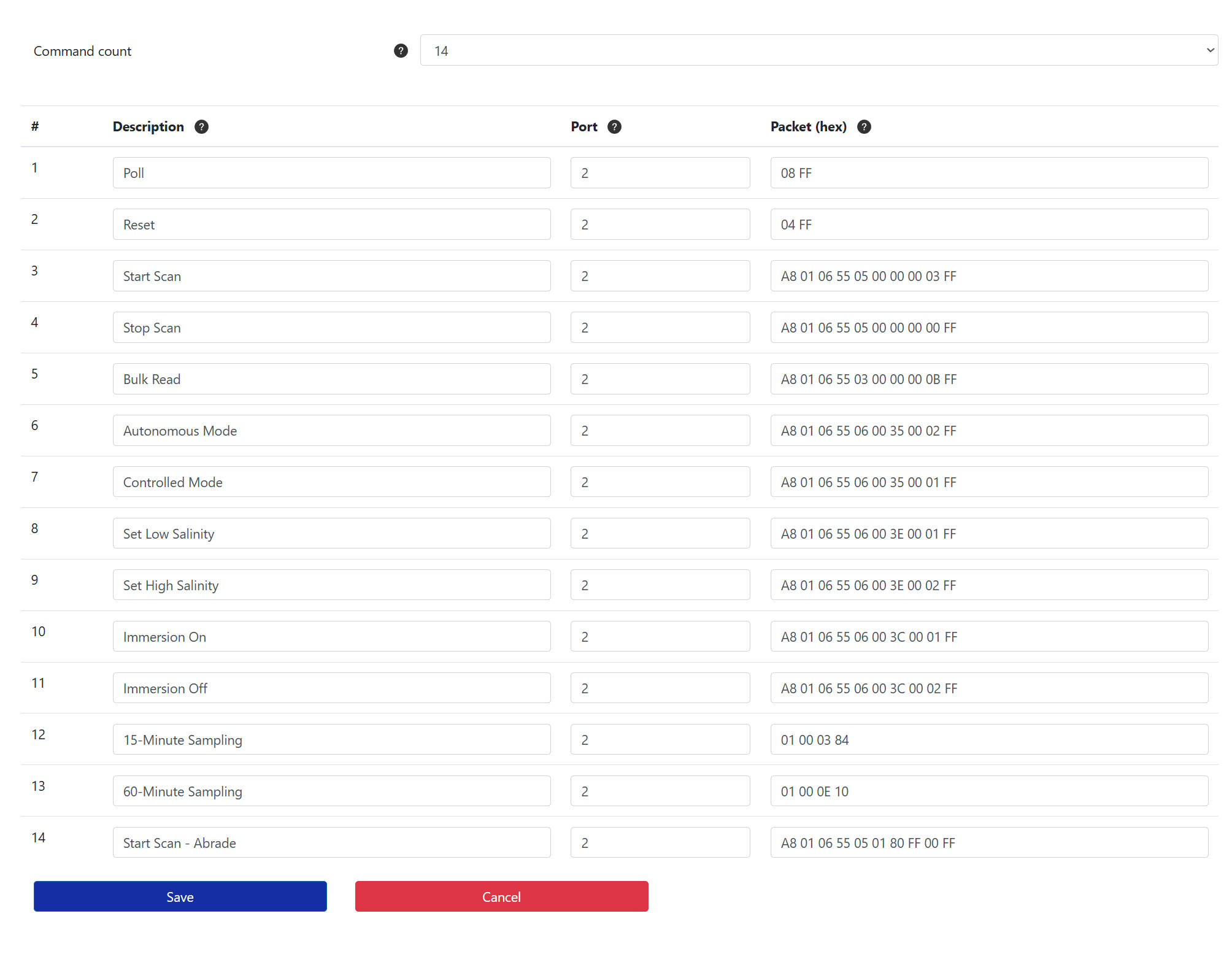
This instruction page covers downlink commands only. Do not create uplink payload decoders unless the user asks separately.
Inputs to Collect
- Downlink documentation: a device manual link, downlink command documentation link, or screenshot/table showing the device downlink commands.
- Device context, if needed: model variant, firmware mode, LoRaWAN region or current device mode, but only ask if the documentation shows different downlink commands for different variants.
Do not ask for the manufacturer or model first. Derive them from the manual or screenshot where possible.
Do not ask for the downlink port first. Derive it from the manual or screenshot where possible. Only ask for the port if it cannot be found or confidently inferred.
If the documentation is long, unclear, inaccessible, scanned, or does not clearly show the command table, ask the user to upload or paste a screenshot of the downlink command section.
Downlink Analysis Rules
- Find the relevant downlink, command, control, configuration or payload command section of the documentation.
- Ignore uplink payload decoder tables unless they are needed only to identify the device or port.
- Infer the manufacturer, model, downlink port, command format, byte order, command identifiers, fixed bytes, variable bytes and allowed values.
- Use only commands that can be represented as a fixed hexadecimal packet in Telemetry2U.
- Do not include placeholders such as
XX,[value],{interval},<threshold>or variables in the final table. - If a command in the manual requires a variable, convert it into useful fixed options where safe and obvious.
- If a command requires a user-specific value that cannot be safely chosen, do not put it in the final table. Mention it briefly under assumptions or ask the user for the required value.
- If the command requires a checksum, CRC or calculated byte, calculate it from the manual if the algorithm is clear. If the algorithm is not clear, ask the user for clarification or omit the command.
- If byte order matters for multi-byte command values, use the byte order specified by the manual. Do not guess if the example packets contradict the written description.
- Format packets as uppercase hexadecimal byte pairs separated by spaces, with no
0xprefixes.
Which Commands to Include
Create a practical command list that a Telemetry2U user would actually send from the Send Node Commands page or attach to dashboard buttons.
Put commands in a sensible order, usually:
- Poll, status request, force uplink or read current state.
- Reboot or restart device.
- Clear counters, reset totals, reset alarms or reset accumulated readings.
- Start, stop, enable or disable key device functions.
- Mode changes, such as automatic/manual mode, scan mode or measurement mode.
- Report, uplink, sampling or heartbeat interval options.
- Device-specific actions that are clearly documented and safe to send.
Do not include every obscure command if the list becomes long. Prefer useful operational commands and common configuration commands.
Variable interval commands:
If the manual supports setting an uplink, report, sampling or heartbeat interval, create fixed commands for useful options where supported by the device: 5 minutes, 10 minutes, 15 minutes, 20 minutes, 30 minutes and 60 minutes. Convert these into the exact packet format required by the manual. Only include values within the allowed range.
Critical Telemetry2U Rules
- Every final command must have a Description, Port and Packet (hex).
- The Command count must equal the number of command rows returned.
- The Port must be numeric and repeated on every command row.
- The Packet (hex) value must be the exact bytes to send to the device.
- Do not include variable commands in the final table.
- Do not include explanatory text inside the table cells.
- Use short, clear descriptions suitable for buttons, such as
Poll,Reboot,Clear Total Energy,15-Minute Reporting,Output OnorOutput Off. - If a command is destructive, include a clear short label such as
Factory ResetorClear All Counters. Do not hide the risk with vague wording. - If the manual says a command requires confirmation, special mode, firmware version or device state, include it only if the requirement is clear and add a brief note under assumptions.
Required Final Output
Keep the final answer short. The user mainly needs values to transfer into Telemetry2U.
Return only the sections below.
1. Downlink Command Setup
| Setting | Value |
|---|---|
| Device | Derived manufacturer/model |
| Downlink Port | Derived port, if known |
| Command Count | Total number of command rows |
| Packet Format | Uppercase hex byte pairs separated by spaces |
2. Downlink Commands
| # | Description | Port | Packet (hex) |
|---|---|---|---|
| 1 | Short command name | Numeric port | HEX BYTES |
3. Short Notes or Assumptions
List only details that are uncertain, values omitted because they require user-specific inputs, or commands that need special caution. Omit this section if there are no meaningful assumptions.
Final Checks Before Replying
- The answer is short and contains no generic decoder code.
- The downlink port is shown and is numeric.
- The Command Count equals the number of rows in the command table.
- Every command has a short Description, Port and Packet (hex).
- Packets are uppercase hex byte pairs separated by spaces.
- No packet contains placeholders, variables, question marks or explanatory text.
- Variable interval commands have been converted into fixed options where safe and supported.
- Commands are ordered from most generally useful to more specialised.
- Any uncertain, destructive or user-specific commands are briefly noted outside the table.
Important:
AI-generated downlink commands should be checked against the device manual before use. Sending incorrect downlinks can change device configuration, clear counters, reboot devices or interrupt monitoring.