Real-Time Monitoring for Milli-Q Water Purification Systems
Telemetry2U adds an independent monitoring layer to compatible Milli-Q® HX and CLX water purification systems. Connect selected 4–20 mA measurements and alarm outputs to live cloud dashboards, historical charts and configurable alerts through a practical LoRaWAN integration.
Independent, Simple to Install and Cost-Effective
Keep laboratory, facilities and service teams informed without replacing the existing purifier or building a complex custom monitoring system.

Keep Critical Laboratory Water Systems Visible After Hours
A local display is useful while somebody is standing beside the system. Independent cloud monitoring keeps selected water-quality measurements, tank conditions and alarm states visible to the people responsible for laboratory continuity when the room is unattended.

Monitoring Built Around Laboratory Continuity
Hospitals, universities and research laboratories can depend on purified water for clinical analysers, instrument feed, reagent preparation and day-to-day laboratory processes. Telemetry2U has deployed this monitoring approach in each of these environments.
- Independent visibility: Review selected purifier measurements without relying only on the local interface.
- Immediate alarm notification: Route warnings and alarm states to laboratory, facilities, service or after-hours teams.
- Historical trend review: Examine water quality, tank level and process behaviour before and during an event.
- Flexible measurement selection: Map two available 4–20 mA outputs to the values that matter most to the installation.
- Multi-site oversight: Bring water systems and other connected laboratory assets into one cloud platform.
- Service access: Give authorised technicians access to the relevant dashboard and history when remote review is useful.
The result is a separate, practical monitoring record that helps teams identify developing problems earlier and respond with better information.
See Water-System Conditions, Alerts and Trends in One Dashboard
Live Readings for Laboratory and Facilities Teams
Telemetry2U presents the selected analogue measurements and alarm states in a responsive interface that can be viewed from desktop, tablet or mobile.
From Current Status to Historical Investigation
Users can review current values, chart historical behaviour and configure alert conditions without building a separate SCADA or building-management integration for a single laboratory system.
- Display selected 4–20 mA measurements with meaningful labels and engineering units.
- Show warning, alarm and major-alarm states from available digital outputs.
- Review historical charts across the period before and after an event.
- Monitor multiple water systems, laboratories or sites from one account.
- Apply user permissions for internal teams and authorised service personnel.
Milli-Q Monitoring and Alert Configuration
Desktop and mobile access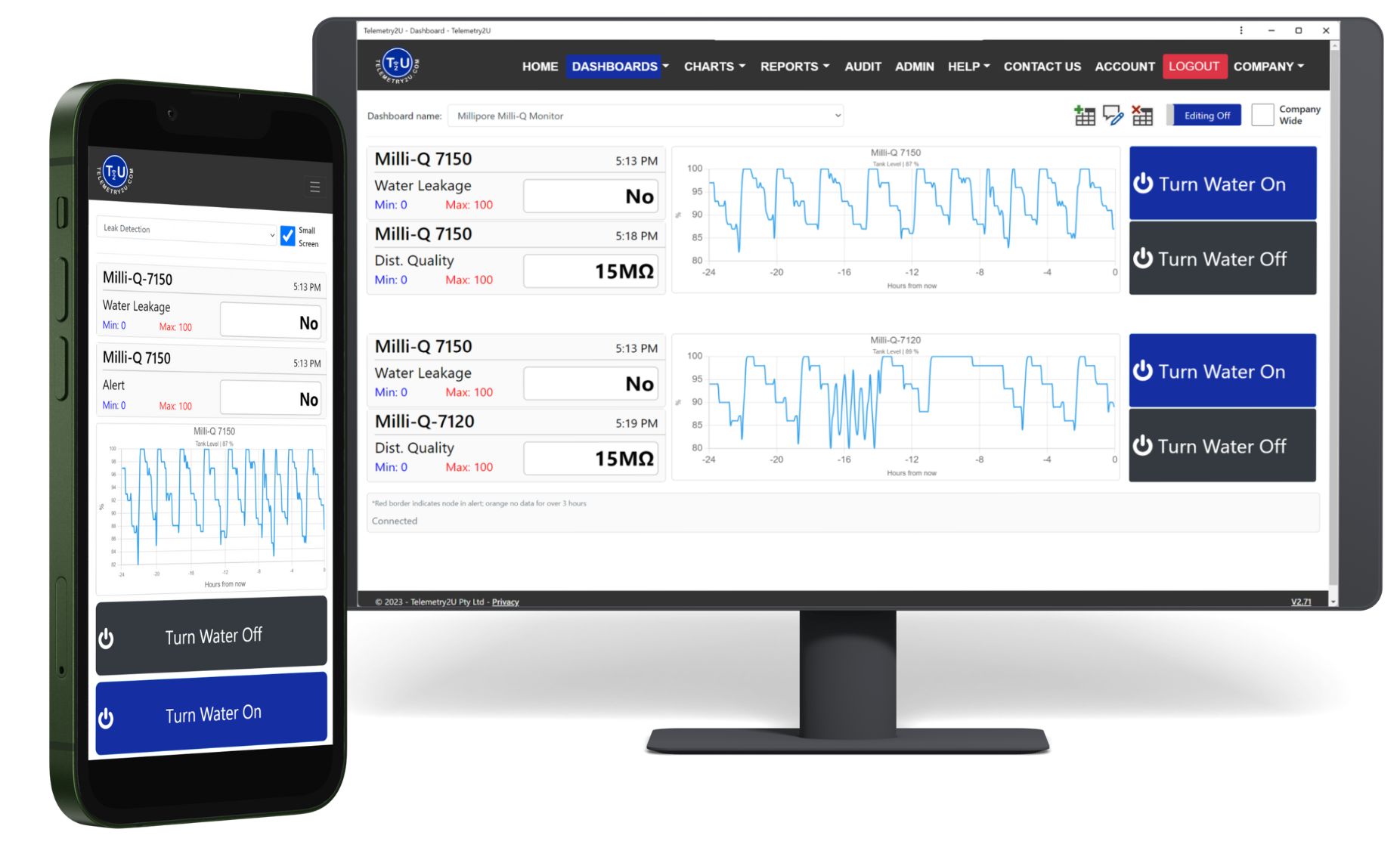
How the Independent Milli-Q Monitoring Integration Works
Compatible HX and CLX systems can expose two alarm outputs and two 4–20 mA measurement outputs through the required alarm-report interface. Telemetry2U converts those signals into a practical LoRaWAN monitoring system.
From Existing Outputs to Cloud Alerts
Connect the IoT
Install the LoRaWAN I/O controller beside the purifier and connect it to the compatible alarm-report interface that exposes the analogue and alarm signals.

Configure the Machine
Use the HX or CLX configuration menus to assign the two 4–20 mA measurements and two alarm outputs required for the installation.

Transmit the Data
The controller sends measurements to an onsite gateway. The gateway can use Ethernet, Wi-Fi or a suitable cellular connection to reach the cloud.
Monitor and Alert
Telemetry2U displays the data, stores history and notifies the configured response team when a threshold or alarm condition is reached.
Quick and Easy Installation of Your Telemetry2U Monitoring System
Telemetry2U can supply the gateway, LoRaWAN I/O controller, cloud configuration and integration support as a coordinated package. A suitable service engineer or internal technical team can complete the onsite work after the exact HX or CLX model, alarm-report interface, output mapping and electrical requirements have been confirmed.
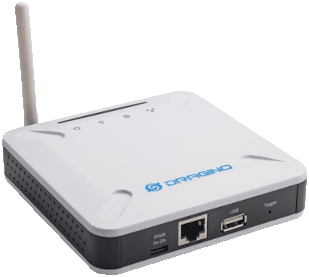
1. Install a LoRaWAN Gateway On-Site
The gateway establishes the long-range radio link between the I/O controller and the Telemetry2U cloud. A single gateway can support many compatible sensors and monitoring devices, subject to coverage, reporting frequency and network design.
- Connect the gateway to the internet by Ethernet, Wi-Fi or a suitable 4G connection.
- Position the gateway to provide reliable indoor radio coverage to the water-system location.
- Use a UPS or suitable battery-backed supply where continued monitoring during a local power interruption is required.
- Confirm the regional LoRaWAN frequency plan and Telemetry2U server settings before registering the I/O controller.
Review the LoRaWAN gateway configuration guide or watch the gateway setup video .
2. Install and Configure the Alarm-Report Interface
Compatible HX and CLX systems require the appropriate alarm-report or DRP interface kit. The accessory provides the connector and pigtail cable used to expose two alarm outputs and two 4–20 mA measurement outputs.
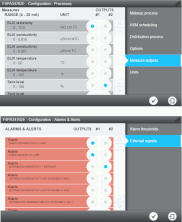
The accessory is ordered separately and can normally be installed with minimal interruption. On supported systems, enable the required outputs through:
- Alarm outputs: Processes > Options > Alarm and Alert Outputs
- Measurement outputs: Processes > Options > Measure Outputs
Example output assignment used by the existing installation:
- Analogue Output 1: Elix resistivity (MΩ.cm TC)
- Analogue Output 2: Tank level (%)
- Digital Output 1: Alerts
- Digital Output 2: Major alerts

3. Configure the Dragino LT22222L I/O Controller
Connect to the controller with suitable terminal software such as RealTerm using . Enter the commands below, then confirm that the device frequency plan matches the onsite gateway.
Tap or click any command to copy it to the clipboard.
| Function | Command |
|---|---|
| Enable confirmed LoRaWAN messages | |
| Enable triggering mode | |
| Enable digital-input interrupts | |
| Configure DI1 for a 24 V trigger with a one-second delay | |
| Configure DI2 for a 24 V trigger with a one-second delay |
Register the configured controller on Telemetry2U and select the correct decoder before relying on any displayed value or alarm state.
4. Wire the I/O Controller to the Alarm-Report Cable
Supply the LT22222L with 12–24 V DC, then connect the two alarm outputs and two 4–20 mA outputs using the mapping below. Wiring must be checked against the cable supplied with the installed HX or CLX system.
| Pin | Colour | Description | LT22222L Input |
|---|---|---|---|
| 1 | Brown | Alarm 1 – +24 V | DI1+ |
| 2 | Blue | Alarm 1 – Trigger | DI1− |
| 3 | Pink | Alarm 2 – +24 V | DI2+ |
| 4 | Yellow | Alarm 2 – Trigger | DI2− |
| 5 | Red | 4–20 mA Output 1 + | ACI1 |
| 6 | Violet | 4–20 mA Output 1 − | GND |
| 7 | Grey/Pink | 4–20 mA Output 2 + | ACI2 |
| 8 | Red/Blue | 4–20 mA Output 2 − | GND |
This table preserves the existing installation example. Confirm pin numbering, conductor colours, polarity and alarm logic before commissioning each site.
5. Calibrate, Label and Confirm the Telemetry2U Inputs
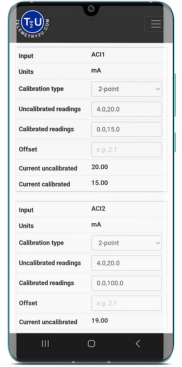
In Telemetry2U, open Admin > Calibrations and scale each 4–20 mA input to the engineering range configured on the water system. The existing example uses the following values:
| Input | Uncalibrated Range | Calibrated Range | Units |
|---|---|---|---|
| ACI1 | MΩ.cm | ||
| ACI2 | % |
Then open Admin > Node Maintenance > Input Labels and apply clear names, units, precision and alarm-state translation.
| Input | Label | Units | Precision | Translator |
|---|---|---|---|---|
| ACI1 | Distribution Quality | MΩ.cm TC | 1 | None |
| ACI2 | Tank Level | % | 0 | None |
| DI1 | Alert | N/A | N/A | 0/1 => Alarm/No Alarm |
| DI2 | Major Alert | N/A | N/A | 0/1 => Alarm/No Alarm |
Hide unused inputs to simplify the dashboard and reports. Confirm every displayed measurement and alarm state against the water-system interface before commissioning.
Turn Water-System Signals into Useful Operational Alerts
The value of remote monitoring is not simply collecting another data stream. Telemetry2U helps the response team see the current condition, receive the right notification and retain the history needed to investigate the event.

Live Dashboards
Display selected water-quality values, tank conditions and system states in clear desktop and mobile dashboards.
IoT dashboard featuresAlert Escalation
Send email, SMS and persistent voice-call notifications to configured users and escalation groups.
Alert and escalation options
Event History
Review charts, alert events and downloaded reports to understand what happened before, during and after a problem.
Reporting and audit history
User Access
Give laboratory, facilities and service users access to the devices, dashboards and records relevant to their role.
User management featuresKeep the Water System in the Same Platform as Other Laboratory Assets
The same Telemetry2U account can also monitor laboratory fridges, freezers, environmental sensors, leak detectors, power conditions and other compatible equipment across one or multiple sites.
Optional Leak Detection and Automated Water Isolation
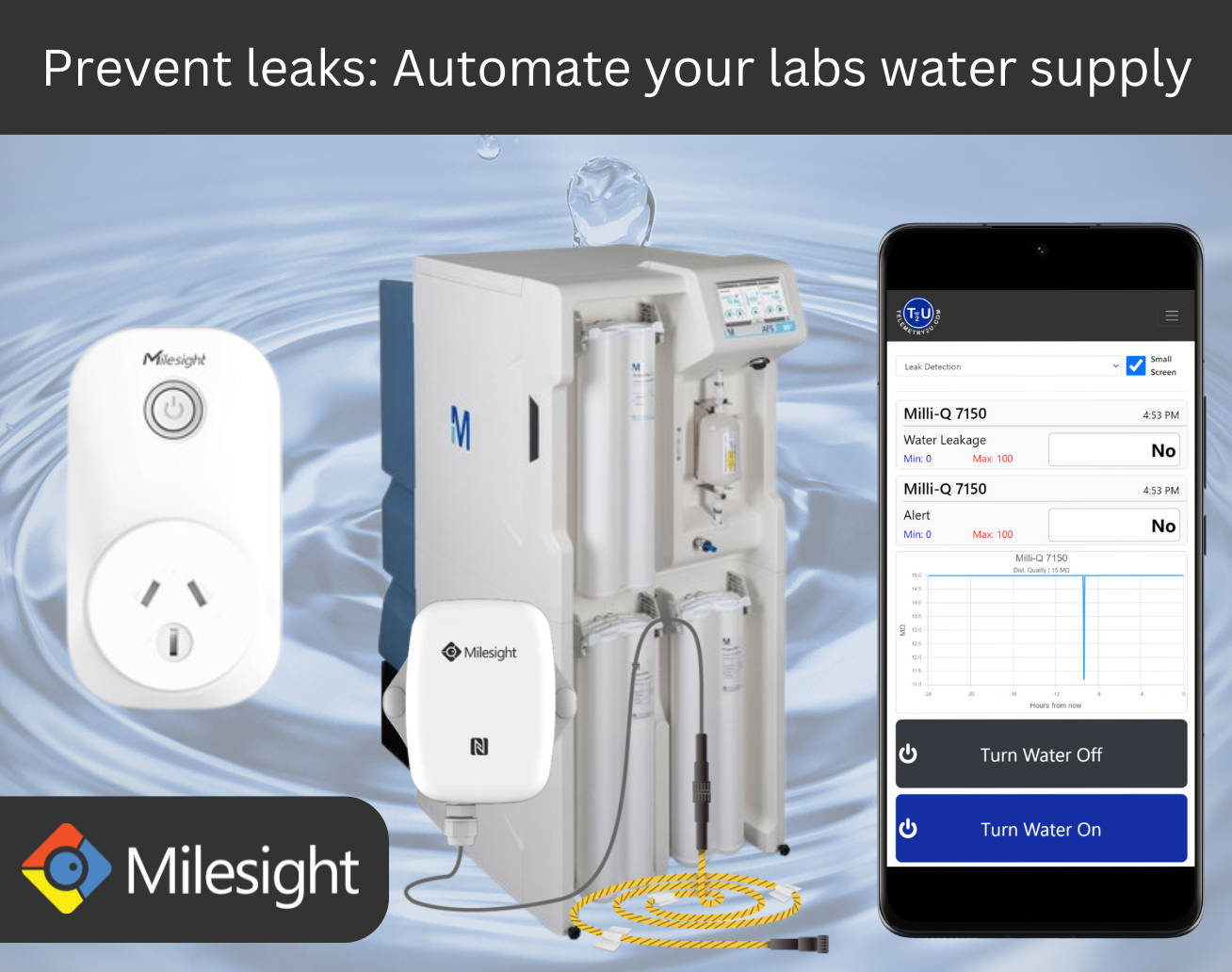
A water purification system can create a significant damage risk when a hose, fitting, reservoir or supply connection fails outside staffed hours. Telemetry2U can extend the monitoring design with independent leak detection and an engineered response.
Respond to a Leak Even When the Laboratory Is Unattended
- Independent leak sensing: Position LoRaWAN leak sensors near the purifier, reservoir, distribution equipment or other identified risk points.
- Immediate notifications: Alert nominated users by email, SMS or persistent voice call when water is detected.
- Optional power isolation: Operate approved control hardware where shutting down the purifier is appropriate for the installation.
- Optional inlet isolation: Close a suitably specified solenoid valve to stop the incoming water supply.
- Remote status visibility: Show leak state, control status and recovery information in the same Telemetry2U dashboard.
- Site-specific engineering: Design the response around the purifier, plumbing, electrical system, operational consequences and local safety requirements.
Automatic control should only be implemented after the failure modes and safe shutdown sequence have been reviewed for the specific laboratory.
Where Independent Milli-Q Monitoring Is Used
This monitoring approach is already suited to hospitals, universities and research laboratories where purified water supports critical instruments, shared facilities and unattended processes. Imbros can assist with the underlying laboratory water system, while Telemetry2U provides the independent monitoring layer.
Hospitals, Universities and Research Laboratories
Independent monitoring is particularly useful where purified water supports critical instruments, shared facilities or unattended processes.
Hospital Laboratories
Monitor purifier alarms, selected water-quality values and supply conditions supporting clinical analyser workflows.
University Facilities
Provide central visibility for shared laboratory water systems used by multiple departments, buildings or research groups.
Research Laboratories
Notify researchers and technical staff before a developing water-system problem disrupts sensitive experiments or instrument operation.
Working with Imbros
Imbros can assist with laboratory water purification systems, local servicing and engineering support. Telemetry2U can then provide the monitoring hardware, platform and alert configuration.

Imbros supplies and supports the Milli-Q® CLX 7080 and related laboratory water systems.
Milli-Q Water Purification Monitoring FAQ
Answers to common questions about compatible HX and CLX systems, 4–20 mA outputs, LoRaWAN connectivity, alerts, retrofits and leak response.
Telemetry2U can integrate with compatible Milli-Q HX and CLX water purification systems fitted with the required alarm-report interface. The interface provides two alarm outputs and two 4–20 mA measurement outputs. Final compatibility and signal mapping should be confirmed for the exact model and options installed.
The two analogue channels can be assigned to selected measurements made available by the water purification system. Typical examples include distribution water quality, tank level, flow or another supported process value. The available choices and engineering range depend on the installed system and its configuration.
The configured 4–20 mA and alarm outputs connect to a compatible LoRaWAN I/O controller. The controller sends readings to an onsite LoRaWAN gateway, which forwards the data to Telemetry2U using Ethernet, Wi-Fi or a suitable cellular connection.
Telemetry2U can send configurable email, SMS and persistent voice-call notifications when an alarm state is detected or a monitored value moves outside its permitted range. Notification groups and escalation paths can be configured for laboratory, facilities, service and after-hours teams.
Monitoring and alerting are the standard functions. An optional leak-response system can be engineered to operate approved relays, smart power hardware or an inlet-water solenoid when a leak is detected. Any automatic isolation function must be designed and installed for the specific site, equipment and safety requirements.
Yes. A compatible existing HX or CLX installation can usually be assessed for retrofit when the required alarm and 4–20 mA outputs are available. Telemetry2U hardware can be supplied pre-configured to reduce onsite setup and interruption.
Yes. Separate user access can be provided for authorised service personnel, internal technicians or facilities teams. Access should be limited to the dashboards, devices and functions required for each role.
Imbros supplies laboratory water purification systems and provides local engineering, servicing and support. Telemetry2U can then provide the independent monitoring hardware, cloud dashboards, alert configuration and integration assistance.
Add Independent Monitoring to Your Laboratory Water System
Tell us the installed HX or CLX model, the measurements you want to monitor and the required alert recipients. Telemetry2U can assess the available outputs and prepare a practical monitoring package for the site.